Description
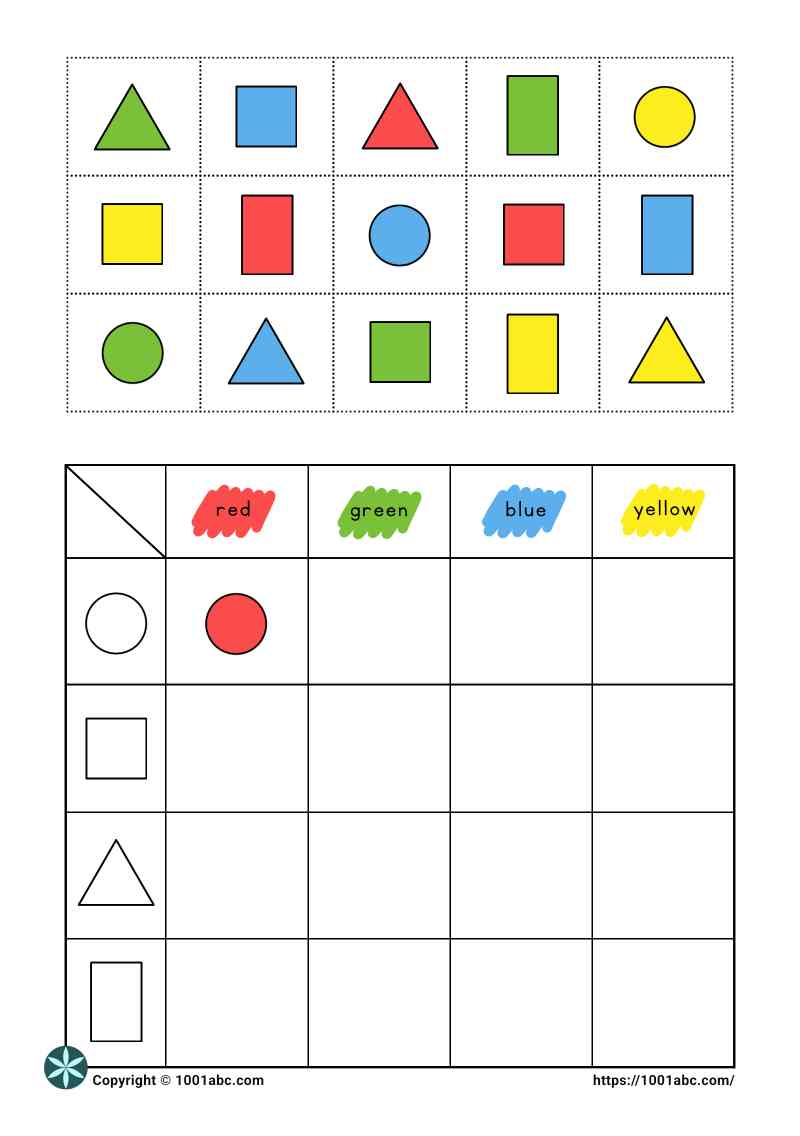
Fifteen colored shapes are shown at the top of the worksheet for children to cut out and sort.
Below the shapes is an information table with four columns labeled circle, square, triangle, and rectangle. One colored shape has already been placed in the table as an example.
Children identify both the shape and the color of each cut-out piece, then paste it into the matching location in the table.
Learning Focus
- Shape recognition: identifying circles, squares, triangles, and rectangles.
- Color discrimination: distinguishing red, green, blue, and yellow.
- Classification by multiple attributes: sorting shapes according to both their shape and color.
- Visual matching: comparing each shape with the corresponding category in the information table.
- Information table interpretation: using row and column categories to determine the correct location for each shape.
- Data organization: arranging visual information systematically in an information table.
- Fine motor coordination: cutting out the shapes and pasting them into the correct locations.
Learning Concept
- Multiple-attribute classification: using both shape and color to determine where each item belongs.
- Data representation: organizing visual information into an information table.
- Logical classification: applying the classification rules consistently to place each shape in the correct category.
- Category formation: organizing shapes into groups based on shared characteristics.
- Visual cue matching: comparing each shape’s attributes with the row and column categories shown in the information table.
Prerequisite Skills
This worksheet is suitable for kindergarten learners, as well as any child who demonstrates the following skills:
- Recognize circles, squares, triangles, and rectangles.
- Recognize or distinguish the target colors visually.
- Match identical shapes and colors.
- Use scissors and glue with basic control.
Instructions
- Cut out the colored shapes.
- Look at the example in the information table.
- Identify the shape and color of one cut-out piece.
- Find the matching location in the table.
- Paste the shape into the correct box.
- Repeat until all the shapes have been sorted.
Download the Worksheet
Download: Color recognition – shape sorting (PDF)
Find similar worksheets: Color Recognition.
Related Worksheets
- Color worksheets
- Vocabulary development
- Information table
- Sorting worksheets
- Shape worksheets
- Kindergarten worksheets
Explore:
***
Please visit Free Printable, to get more coloring pages and worksheets for kids.